Sharing
Share your study notes publicly or privately to help others learn and collaborate with study partners
Sharing transforms your personal study notes into learning resources for others. Whether you want to help classmates, build a portfolio of notes, or collaborate with study partners, Notesmakr's sharing features make it easy to spread knowledge.
Why Share Your Notes?
Help Others Learn
Your simplified explanations can help fellow students who are struggling with the same material.
Build a Study Resource Library
Share notes publicly to create a searchable collection that others can discover and benefit from.
Collaborate with Study Partners
Share notes with specific friends or study groups for collaborative learning.
Portfolio for Academic Work
Showcase your study notes as examples of your learning process for applications, scholarships, or portfolios.
Teach to Learn
Sharing notes reinforces your own understanding—knowing others will see your work motivates you to explain more clearly.
Teaching others (even strangers on the internet) is one of the most effective ways to solidify your own understanding. Sharing notes activates the Feynman Technique at its highest level!
How Sharing Works
When you share a study note, Notesmakr creates a public or unlisted web page that displays:
Study Guide View
Viewers see your study guide in a clean, readable format displaying the simplified content (your Feynman explanation) if available, or the original content as a fallback.
What's Included
- Simplified content — Your explained version of the material
- Original content — The source material (if simplified version doesn't exist)
- Note metadata — Title and creation date
What's NOT Included
- Study tools — Quizzes, flashcards, and mind maps remain private
- Personal annotations — Typed notes, handwritten drawings, and voice recordings remain private
- Highlights and underlines — Your text markups are not shared
- Study progress — Study time, comprehension levels, and last studied dates remain private
- Tags and organization — Your personal categorization system remains private
- Profile information — Unless you choose to display your author name
- Edit capabilities — Viewers can only read (read-only mode)
When you share a study note, only the core content (simplified or original text) is shared. Study tools (quizzes, flashcards, mind maps), personal annotations, highlights, and study progress remain completely private—for your eyes only!
Sharing Options
Notesmakr offers two types of sharing:
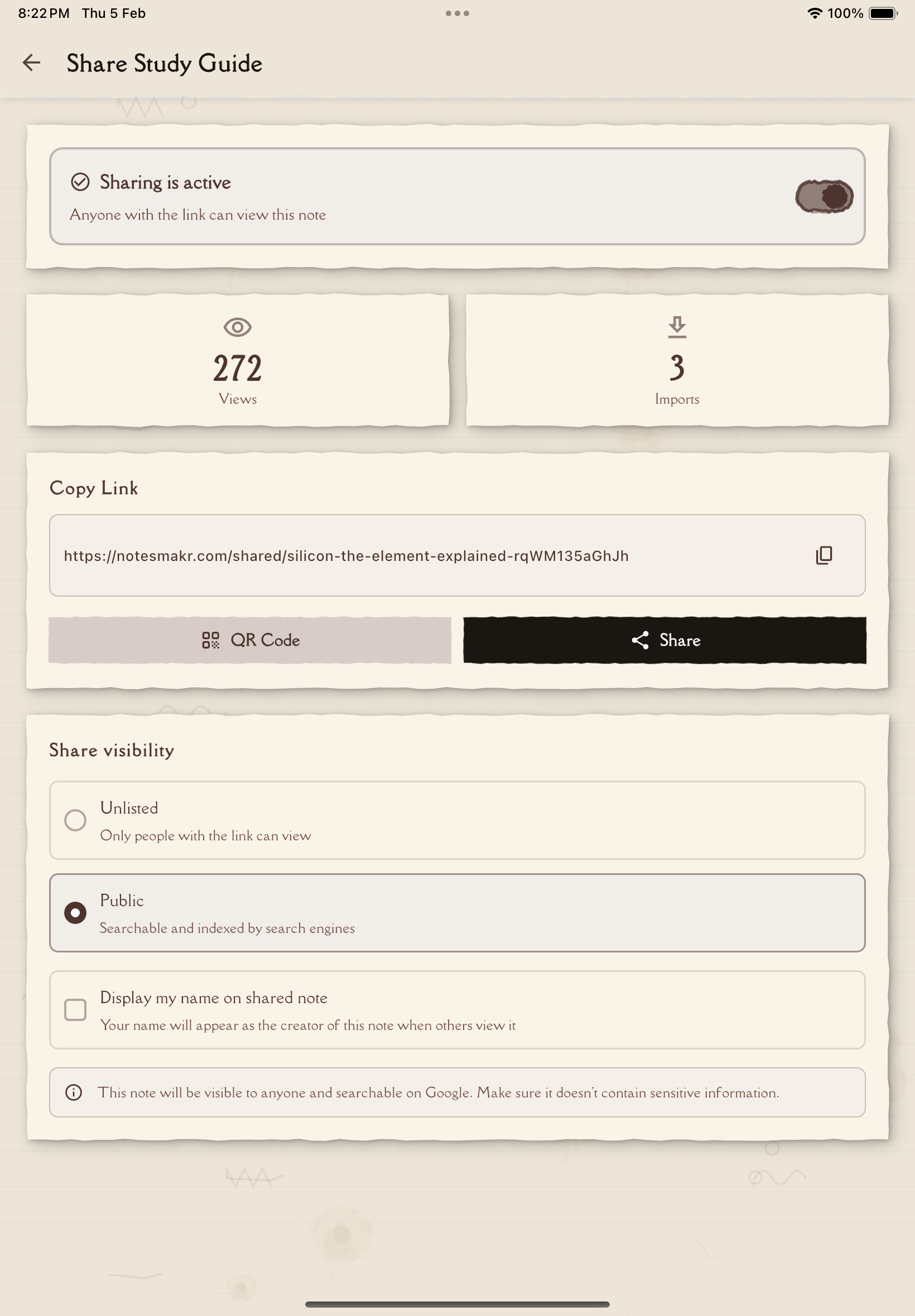
Public Sharing
Your note is listed in Notesmakr's public library and can be discovered through search engines and the app's browse feature.
Best for:
- Helping the wider learning community
- Building a public study resource library
- Getting discovered by people interested in the topic
- Contributing to open educational resources
Visibility:
- Appears in Notesmakr's public note directory
- Indexed by search engines (Google, Bing, etc.)
- Shareable on social media
- Anyone with the link can access
Unlisted Sharing
Your note is accessible via direct link only—not listed publicly or searchable.
Best for:
- Sharing with specific friends or study groups
- Keeping notes semi-private
- Testing sharing before going fully public
- Selective distribution
Visibility:
- NOT listed in public directory
- NOT indexed by search engines
- Accessible only to people with the direct link
- Still readable by anyone who has the link (not password-protected)
Start with unlisted sharing to test how your note looks shared. Once you're happy with it, you can switch to public to help more people!
What Viewers Experience
When someone accesses your shared note, they get a dedicated web page with:
Clean, Readable Layout
Your content displayed in a distraction-free, mobile-friendly reading mode with easy navigation through pages.
No Account Required
Viewers don't need a Notesmakr account to read shared notes—just the link.
Import to Personal Collection
Viewers can import the shared note to their own Notesmakr account by tapping the Import button. This creates a completely independent copy that they can:
- Annotate and highlight
- Generate their own study tools from
- Modify and personalize
- Track their own study progress
The import creates a fresh copy—your original note and any updates you make won't affect their imported version.
What You'll Find in This Section
This section covers everything about sharing your study notes:
- Sharing a Note — Step-by-step guide to generating and managing share links
- Viewing a Shared Note — What the viewer experience looks like
Sharing and Privacy
What's Safe to Share
- Study notes you've created from public sources (textbooks, online articles, videos)
- Your own original explanations and simplifications
What NOT to Share
- Copyrighted material you don't have permission to redistribute
- Notes containing private or sensitive information
- Class materials your teacher designated as private
- Personal identifiable information
You're responsible for ensuring you have the right to share your note content. If your note contains copyrighted material from textbooks or private class resources, check with your instructor before sharing publicly.
Sharing Best Practices
Write for Your Audience
When creating notes you plan to share:
- Use clear, accessible language
- Define technical terms
- Include context (don't assume viewers have background knowledge)
- Proofread for clarity and errors
Add a Helpful Title
Make your note title descriptive and searchable:
- Good: "Photosynthesis: Simple Explanation for High School Biology"
- Bad: "Biology Notes"
Write Clear Content
Make your simplified explanation as clear as possible. The better you explain the concept in your own words, the more helpful it will be to others.
Keep It Accurate
Double-check facts and explanations. Others are relying on your note to learn correctly!
Update When Needed
If you discover errors or improve your understanding, update shared notes so viewers get the best information.
Sharing notes publicly can feel vulnerable—what if you got something wrong? Remember that all learning is iterative. If someone finds an error, you can update it. Imperfect shared notes that help people are better than perfect notes that never get shared!
Community and Collaboration
Sharing notes opens opportunities for:
Discovering Similar Learners
Connect with people studying the same topics.
Building Reputation
Consistently sharing high-quality notes can establish you as a helpful resource in your learning community.
Motivating Others
Seeing your notes might inspire others to create and share their own, growing the collective knowledge base.
Report Inappropriate Content
If you encounter a shared note that contains spam, inappropriate content, copyright violations, or offensive material, you can report it using the flag icon. This helps keep the community safe and focused on learning.
Next Steps
Ready to share your first note? Check out:
- Sharing a Note — Learn how to generate and manage share links
- Viewing a Shared Note — See what viewers experience
Start sharing and help build a community of learners!