Q&A Session
Ask AI questions about your notes to clarify confusion and deepen understanding
Q&A Sessions let you have a conversation with AI about your note's content. Ask questions, get explanations, explore deeper—it's like having a tutor available 24/7 who knows your study material inside and out.
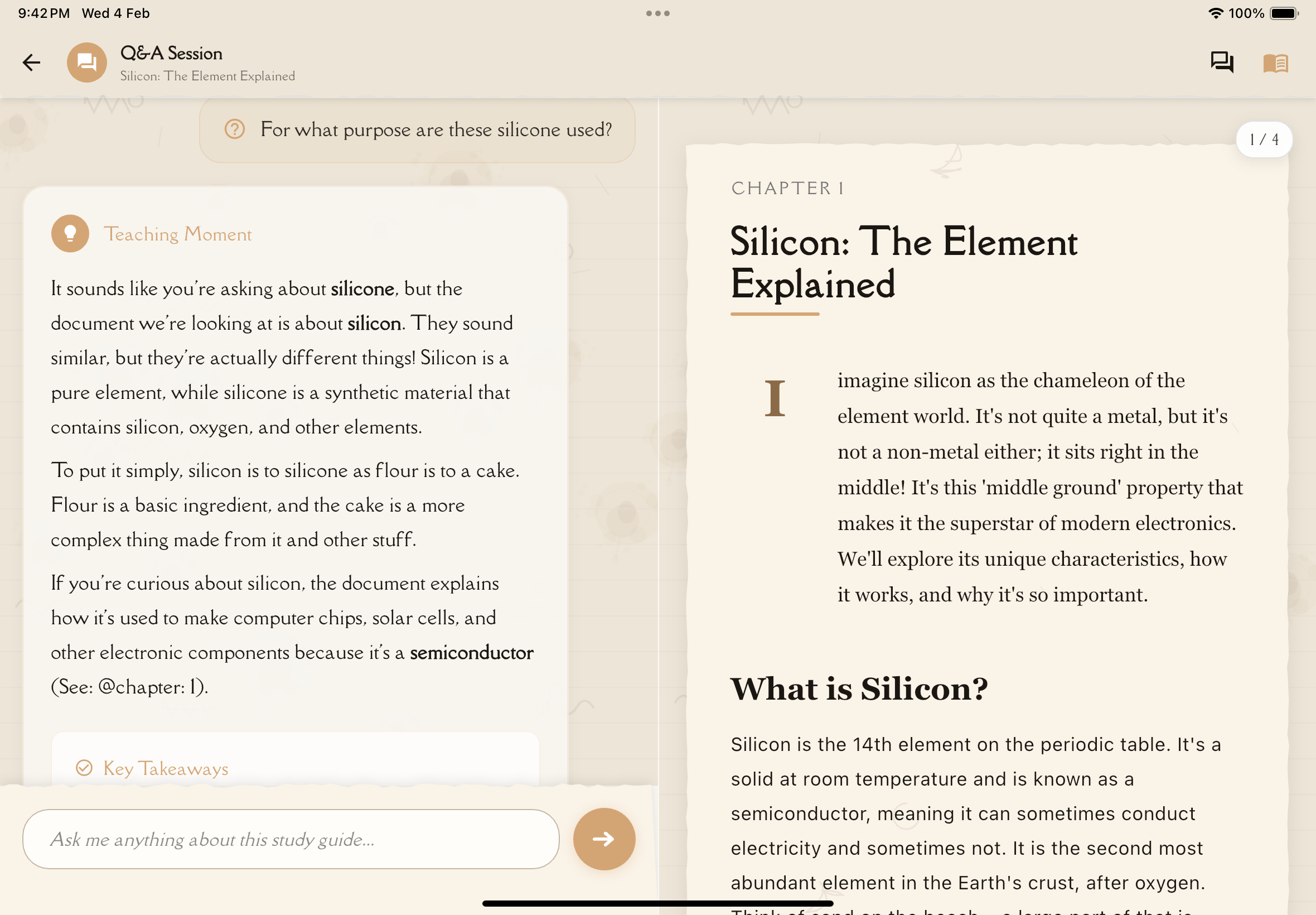
What is Q&A Session?
Q&A Session is an AI-powered chat interface focused on your specific note. Unlike general AI chatbots, this AI:
- Knows your note: Has full context of the content
- Gives relevant answers: Responses are grounded in your material
- Remembers conversation: Follows up on previous questions
- Provides examples: Uses concepts from your note
- Cites sources: References sections of your note
Perfect for the "fill the gaps" phase of the Feynman Technique!
Use Q&A when flashcards or quizzes reveal concepts you don't understand. Instead of just memorizing, actually understand by asking "Why?" and "How?"
Starting a Q&A Session
Navigate to any note from the Notes tab.
Tap the Study Tools tab.
Select the Q&A Session card. The chat interface opens.
Type your question in the text input at the bottom and tap send.
Asking Great Questions
The quality of answers depends on the quality of questions. Here's how to ask effectively:
Question Types That Work Well
Clarification Questions:
- "What does [term] mean in this context?"
- "Can you explain [concept] more simply?"
- "I don't understand the part about [topic]. Can you rephrase it?"
Why/How Questions:
- "Why does [phenomenon] happen?"
- "How does [process] work step-by-step?"
- "What causes [event/result]?"
Application Questions:
- "Can you give me a real-world example of [concept]?"
- "How would I use [concept] in [situation]?"
- "What's a practical application of [theory]?"
Connection Questions:
- "How is [concept A] related to [concept B]?"
- "What's the difference between [X] and [Y]?"
- "How does [topic] fit into the bigger picture?"
Example Questions:
- "Can you show me an example problem using [formula]?"
- "What's an example of [concept] in history/literature/nature?"
- "Walk me through a specific case of [process]."
Analogy Questions:
- "Can you explain [complex topic] using an analogy?"
- "What's [concept] similar to that I might already understand?"
- "How is [topic] like [familiar thing]?"
Question Structures to Avoid
Too vague:
- ❌ "Tell me about this note"
- ✅ "What are the three main concepts in this note?"
Too broad:
- ❌ "Explain everything"
- ✅ "Explain the relationship between photosynthesis and cellular respiration"
Yes/No (without follow-up):
- ❌ "Is photosynthesis important?"
- ✅ "Why is photosynthesis important for life on Earth?"
Outside the note's scope:
- ❌ "What's the capital of France?" (unless your note is about France)
- ✅ Questions about content actually in your note
Be specific! Reference exact terms, concepts, or sections from your note. The more specific your question, the more useful the answer.
Using Q&A Effectively
Strategy 1: Fill Flashcard Gaps
When you keep getting flashcards wrong:
Identify exactly what you don't understand from the flashcard.
"Can you explain [concept] in simpler terms?"
"Can you give me 2-3 examples of [concept]?"
"If [scenario], would [concept] apply? Why or why not?"
Review those cards again with new understanding.
Strategy 2: Explore Quiz Mistakes
When you get quiz questions wrong:
Paste the quiz question you missed into Q&A.
"Why is [correct answer] right and [my answer] wrong?"
"What concept am I misunderstanding?"
"Can you explain this concept a different way?"
"So if I understand correctly, [restate concept]?"
Strategy 3: Exam Preparation
Preparing for tests:
"What type of exam questions might be asked about [topic]?"
"Ask me to explain [concept] and evaluate my answer"
"What are the most important things to remember about [topic]?"
"How might [concept A] appear alongside [concept B] on an exam?"
"What should I focus on most for a comprehensive exam on this material?"
Strategy 4: Deep Understanding
When you want to truly master something:
"Why is [concept] significant?"
"How was [concept] discovered/developed?"
"Where is [concept] used in the real world?"
"What happens if [assumption] doesn't hold?"
"How does [concept] relate to other fields/topics?"
Advanced Q&A Techniques
Multi-Turn Conversations
Don't treat Q&A like a search engine—have a conversation!
Initial question: "How does photosynthesis work?"
AI response: [Detailed explanation]
Follow-up 1: "What role does chlorophyll play specifically?"
AI response: [Focused explanation]
Follow-up 2: "Can you give me an analogy for how chlorophyll captures light?"
AI response: [Analogy provided]
Follow-up 3: "So if I understand correctly, chlorophyll is like a solar panel for the plant?"
AI response: [Confirmation and refinement]
Each follow-up builds on the previous answer, deepening understanding.
Requesting Different Formats
Ask for answers in specific formats:
Step-by-step: "Explain the Calvin Cycle in 5 numbered steps"
Bullet points: "List the key differences between mitosis and meiosis in bullet points"
Table/Comparison: "Create a comparison table of prokaryotic vs eukaryotic cells"
Timeline: "Give me a timeline of events leading to World War I"
Analogy: "Explain TCP/IP using a mail delivery analogy"
Code/Formula: "Show me the formula and explain each variable"
Checking Your Understanding
Use Q&A to verify you've learned:
Restate and confirm: "Let me see if I understand: [your explanation]. Is that correct?"
Apply to examples: "If [scenario], would [concept] mean that [outcome]?"
Predict outcomes: "What would happen if [variable changed]?"
Teach back: "I'll explain this concept—tell me if I'm right or what I'm missing: [your explanation]"
Q&A Interface Features
Conversation History
All conversations are saved with your note:
- Scroll up: See previous questions and answers
- Reference earlier: "As you explained earlier about X..."
- Resume later: Leave and return—conversation persists
Copy Answers
Useful content? Save it:
- Long-press answer: Copy to clipboard
- Paste to Personal Notes: Add AI explanations to your note
- Share: Send to study partners
Regenerate Answers
Didn't like the response?
- Tap regenerate icon: Get a different explanation
- Specify preference: "Explain that more simply" or "Give more technical detail"
Clear Conversation
Start fresh:
- Clear chat button: Remove conversation history
- AI "forgets" previous questions
- Useful when switching topics within the same note
Source References
AI cites your note:
- Answers include references like "(See: Photosynthesis section)"
- Tap reference: Jump to that section in Reading tab
- Verify AI answers against source material
Always verify important information from Q&A by checking the original note content. AI is very good but not perfect—it can occasionally misinterpret or extrapolate incorrectly.
Common Q&A Use Cases
1. Understanding Complex Terminology
Before reading: "What do these terms mean: [list of unfamiliar terms from the note]?"
Gets you oriented before diving into content.
2. Breaking Down Difficult Sections
When stuck: "The section about [topic] is confusing. Can you break it down more simply?"
Simplifies without losing key information.
3. Connecting to Prior Knowledge
Building on what you know: "How does [new concept] relate to [something you already understand]?"
Links new learning to existing knowledge.
4. Generating Practice Problems
For active practice: "Create 3 practice problems about [concept] with solutions"
Tests understanding beyond provided quizzes.
5. Summarizing Long Sections
For quick review: "Summarize the key points from the section on [topic] in 3 sentences"
Condenses without losing core ideas.
6. Explaining Diagrams/Visuals
For image-heavy notes: "The note mentions a diagram showing [X]. Can you describe what it illustrates?"
Fills in visual information that OCR/AI may have described minimally.
Tips for Effective Q&A
Q&A best practices:
- Be specific: Reference exact terms and concepts from your note
- Ask follow-ups: Don't stop at the first answer—dig deeper
- Request examples: Abstract explanations need concrete cases
- Verify understanding: Restate and ask "Is that right?"
- Use for gaps: Focus on what you don't understand, not what you do
- Save good answers: Copy useful explanations to Personal Notes
- Cross-reference: Check AI answers against the original note content
- Ask "why": Understanding "why" is deeper than knowing "what"
- Try analogies: Request comparisons to familiar concepts
- Practice teaching: Explain back to AI and ask for feedback
Limitations and Best Practices
What Q&A Can Do
✅ Explain concepts from your note ✅ Provide examples and analogies ✅ Answer clarifying questions ✅ Break down complex ideas ✅ Connect related concepts ✅ Generate practice problems ✅ Summarize sections
What Q&A Cannot Do
❌ Access information outside your note (without explicitly noting it) ❌ Update or edit your note content ❌ Grade your answers with absolute certainty ❌ Replace reading the original material ❌ Guarantee 100% factual accuracy (always verify)
When to Use Q&A vs Other Tools
Use Q&A when:
- You need clarification or explanation
- Something doesn't make sense
- You want examples or analogies
- You're exploring connections
Use Flashcards when:
- You need to memorize facts
- You want spaced repetition
- You're testing quick recall
Use Quizzes when:
- You want comprehensive testing
- You're preparing for exams
- You need to identify all gaps
Use Mind Map when:
- You need to see structure
- You're understanding relationships visually
- You want the big picture
Each tool has its place—combine them for best results!
What's Next?
Explore other study tools:
Or continue your learning journey:
Ask questions, get answers, truly understand!