Web Experience
Join and play group study sessions from a web browser without installing the app
Participants can join Group Study sessions from any web browser — no app installation required. This is perfect for classmates or study group members who don't have the Notesmakr app.
How It Works
The host creates a session in the Notesmakr app and shares a link. Anyone with the link can open it in a browser and join the game. The web experience includes the full flow: joining, the lobby, gameplay, and results.
Joining from the Web
Via Link
Click the session link shared by the host (e.g., notesmakr.com/group-study/join/ABC123). It opens in your browser.
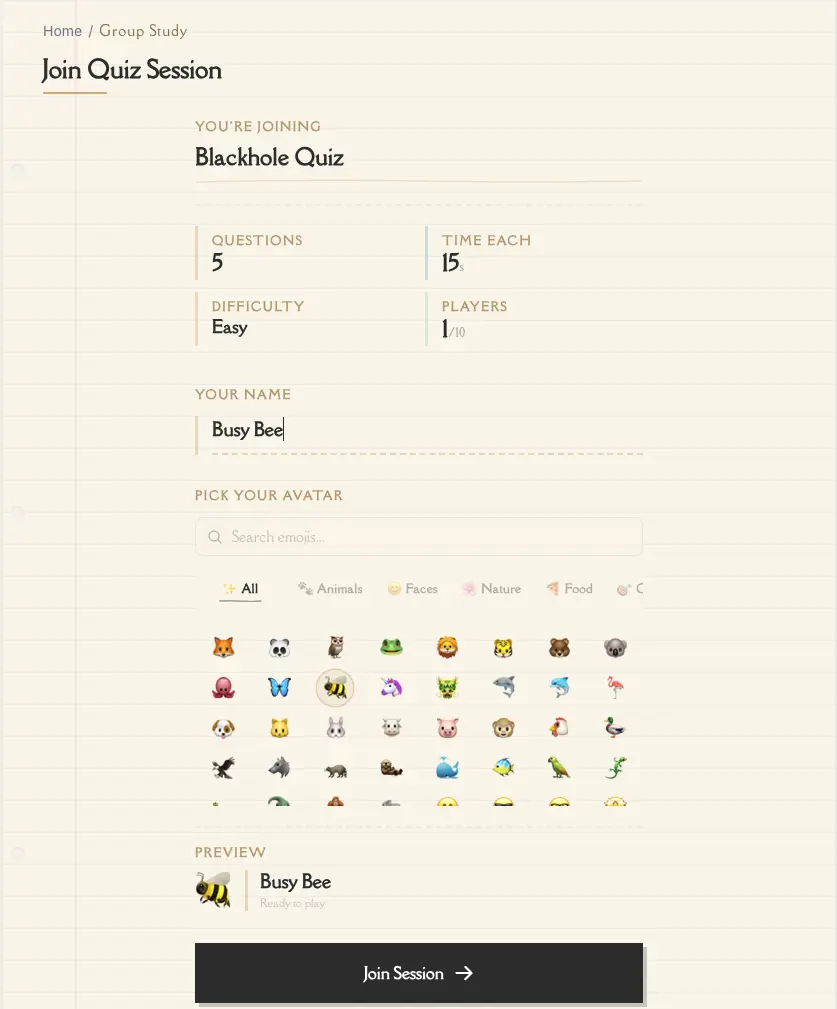
The page shows the session title, number of questions, time per question, and difficulty level.
Type the name you want others to see during the game.
Pick an emoji from the avatar picker.
Tap the Join Session button to enter the lobby.
Via Manual Code Entry
Go to notesmakr.com/group-study/join in your browser.
Type the code the host shared with you.
Enter your display name, pick an avatar, and tap Join Session.
Web Game Experience
The web experience mirrors the app:
- Lobby — see other participants joining in real-time, wait for the host to start
- Countdown — 3-2-1 GO! animated countdown before the first question
- Questions — same timer bar, question display, and four answer cards (A, B, C, D)
- Results — same leaderboard between questions, same final podium and stats
- Responsive design — works on phones, tablets, and desktop browsers
The web version uses the same vintage notebook aesthetic as the app — lined paper, torn paper cards, and warm tones.
Web participants do not need a Notesmakr account. Anyone with the link or code can join and play as a guest.
Differences from the App
- Cannot host sessions — hosting requires the Notesmakr app
- No session history — your session data is stored in the browser tab only; closing the tab loses your local session data
- No account needed — web players join as guests with just a display name
- App download CTA — after the game, a banner encourages downloading the app for the full experience
The web experience is great for classroom settings. The host runs the session from the app, while students join from their laptops or phones via a browser — no installation needed.
Supported Browsers
The web experience works on any modern browser:
- Chrome 90+
- Safari 15+
- Firefox 90+
- Edge 90+
Troubleshooting
Session not found
The code may be incorrect, or the session may have already ended. Double-check the code with the host.
Lost connection
Refresh the browser page. If the session is still active, you may be able to reconnect. If the game has progressed past you, check with the host about starting a new session.
Page doesn't load correctly
Make sure you're using a modern browser (see Supported Browsers above). Clear your browser cache and try again.
Next Steps
- Joining a Session — more details on the join flow
- During the Game — understanding the gameplay interface